Sunday, January 27, 2013

5 Easy Ways to get Traffic to Your Website


Everyone in the online industry requires traffic in order to survive and profit.
Lately, most people turn to search engine optimization in order to increase their traffic and get some quality leads.
But search engine optimization can be time consuming and sometimes results are very hard to come by.
Although SEO is necessary and is the best way to go about it, there are tons of different ways to get immediate traffic to your website until organic traffic kicks in.

Blogging

For any company that owns a website, or for any webmaster owning an ecommerce store or a service website, blogging is the key to traffic as well as link baiting and keyword targeting.
Blogging shouldn’t be missed if you are in the online industry. Blogging will give any website the opportunity to present itself to immediate audience, not to mention the fact that blog posts can become viral and attract many links. But for immediate purposes they are far better and faster at attaining targeted traffic.

Forums

Most people think that forums are dying. Well, this is not true. The fact is that forums were ones social networks we used to hang at, now, forums are mostly niche specific and are visited only by highly interested parties.
So in other words, forums are a great place to promote yourself and your website and come off as a specialist in your niche and get that targeted traffic and those topic hungry visitors.

Social sites

Of course we mentioned social media sites and social networks. From the moment they were created, they were one of the best ways to get immediate traffic. But in order to get that traffic you need to participate in the community.
Surround yourself with people from your niche and communicate with them on a regular basis, in return your word will get out and as soon as you publish something new, people will know and they will spread it around.

Press releases

Although press releases are not good for creating links, they are still one of the best ways to create a hot buzz and get some hot and targeted traffic.
In order to use the press releases the right way, you need to have something newsworthy to offer, so that often intertwines with link bait and new services or products that people will want to know about.
You can also use the other side of news, and that is to post hot news on your own blog or website. The best course of action is to create a news section on your website and regularly post news regarding your niche and your topic. That can be a great way to get some traffic as well as links.

Reviews

Of course you can use others to get immediate traffic. Two ways to go about it, one is guest blogging and using the power of other people’s influence in your niche to get some decent and highly targeted traffic and the other way is to pay for product or service reviews.
Review Me is a great place to get some high quality reviews. Of course you can start a contest for the best review and offer a prize and create it into a media event that will get even more traffic and more attention.
You can get plenty of highly targeted traffic to your website just from these few tips, and with some creativity you can create a landslide of traffic without search engines.
But the greatest benefit of the above presented ideas is that all of them will help you with search engine optimization and link building and add to your organic traffic.
Zarko Zivkovic works as SEO strategist and link builder. He is the founder of Practical SEO as well as the chief editor and writer for Practical SEO Blog. You can connect with him on Twitter.

Tuesday, January 8, 2013

How to Find High Paying Keyword for Adsense


If you are using Google adsense in your blog as a monetizing method, then you must be aware of high paying keywords. Every keyword is not paying the same amount for each clicks. Therefor, it’s advisable to find and insert high paying keywords in your blog or posts. Let me show in this post how to find high paying keywords for adsense.
The simple and free tool we can use for this purpose is , Google keyword tool. It’s a free product for adsense users. Google keyword tool is not designed for publishers like us, it’s designed for advertisers who are looking to advertise through Google adwords. But, as publishers and bloggers we can utilize this product to find the high paying keyword for adsense.
Ok, lets go with an example.
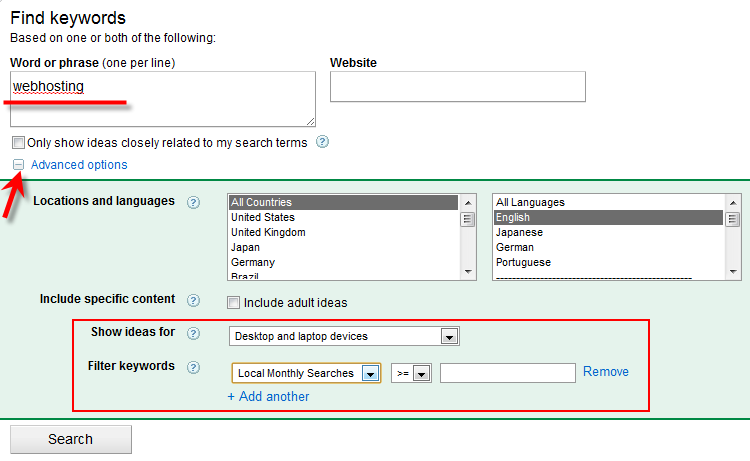
If you are planning to write a post about “Webhosting”, go to Google keyword tools and enter the keyword phrase.
Find High Paying Keyword for Adsense
Some filter options are available under Advanced options.
Once you press the Search button, it will list out  the keywords related to search term. The fields are easy to understand.
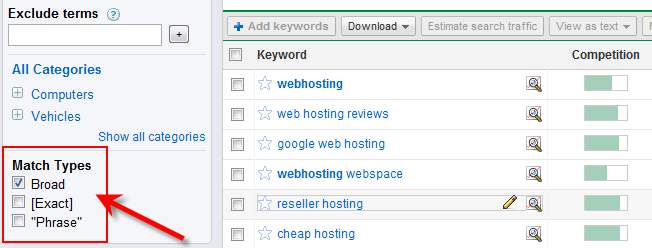
If you still can’t find the very suitable keyword for ‘Webhosting’, this can be filtered by Match Typesin left side.
Find High Paying Keyword for Adsense
Remove the ‘Board’ type and select either Exact or Phrase.
‘Exact’ will bring the more relevant keyword for your search term.
“Phrase” will bring the same search term text in keywords.
But, we are here to get the high paying keyword related to ‘Webhosting’, so first do not not change any filter types under Match Types.
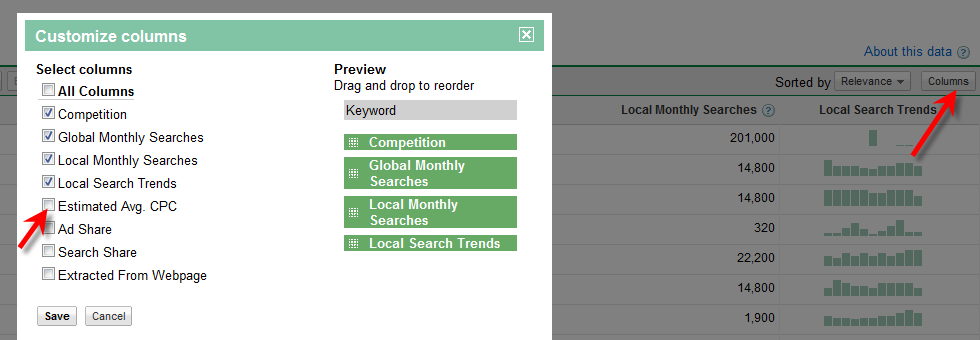
The first result screen in Google keyword tool doesn’t show the Estimated Avg CPC ( which decides the value of keyword), we have to enable this column by doing following steps.
Click on columns in right side of menu bar and select the Estimated Avg CPC.
enable_estimate_CPC

What is Estimated Avg CPC?

As I said earlier, this tool is for advertisers. If I’m a advertiser and want to advertise my product or service through Google adwords, then I have to select some keyword for each ad slots.
For example if my main keyword for this ad campaign is ‘webhosting’, then I  have to bid (pay) more than Estimated Avg CPC for ‘webhosting’ keyword for a click to beat the competitors.  So, my ads will be displayed in Google’s first search result (Search results related to webhosting), top blogs and blog posts related to ‘webhosting’.
So, obviously high Estimated Avg CPC means, high pay out for publishers also if we get the correct ads.
Now click on Estimated Avg CPC column to sort the filed.
final result
Here you have to understand something clearly and select the correct keyword.

Competition

Again this is not for us, this means the competition between advertisers, there are more advertisers bidding and advertising on this keyword.
If you want to find the competition for specific keyword as a blogger, then just simply type this keyword in Google and see the number of search results found.
The arrow mark I showed next to Competition column will give more ideas on this keyword about trend and history from Google Insights. It’s another handy tool for bloggers to find out the good keyword and niche for a blog or post.

Global and Local Searches

This should be considered too. If you target only high paying keyword but no one is searching that, then its pointless and you can’t make any money from adsense.
You should be very smart to select the correct high paying keyword. If you select the high searched keyword, then it will have more competition. Getting in to Google’s first page for this keyword is not at all an easy task.
In this example, I would prefer to write about ‘ Top web hosting’. Its having high paying keyword with good search history.
But unfortunately, its having more competition with 140,000,000 results (as of today). so I don’t think I can beat them.
search result
In this case, I follow my own way to utilize this high paying keyword to monetize my blog posts with adsense.
I will write that technique in coming days.
Feel free to drop your comments and suggestion about these steps.

How to add AdSense to WordPress


With WordPress you can easily add your AdSense code to your blog. In order to do this, first login to the administrative end of your website. Then, go to the Appearance -> Widgets menu.
In this page select to add a "Text" widget and click on the "Add" button next to it.
Then a new window with your widget will open. Click on the edit link in its right part in order to open the edit panel of the widget. You should add a title (in our case - Advertisement) and right under it the actual code that you have obtained from Google. Next, click on the "Done" button and after that on the "Save Changes" button right under it.
Well done! You have just added your AdSense code to your WordPress blog.