
If you are using Google adsense in your blog as a monetizing method, then you must be aware of high paying keywords. Every keyword is not paying the same amount for each clicks. Therefor, it’s advisable to find and insert high paying keywords in your blog or posts. Let me show in this post how to find high paying keywords for adsense.
The simple and free tool we can use for this purpose is , Google keyword tool. It’s a free product for adsense users. Google keyword tool is not designed for publishers like us, it’s designed for advertisers who are looking to advertise through Google adwords. But, as publishers and bloggers we can utilize this product to find the high paying keyword for adsense.
Ok, lets go with an example.
If you are planning to write a post about “Webhosting”, go to Google keyword tools and enter the keyword phrase.
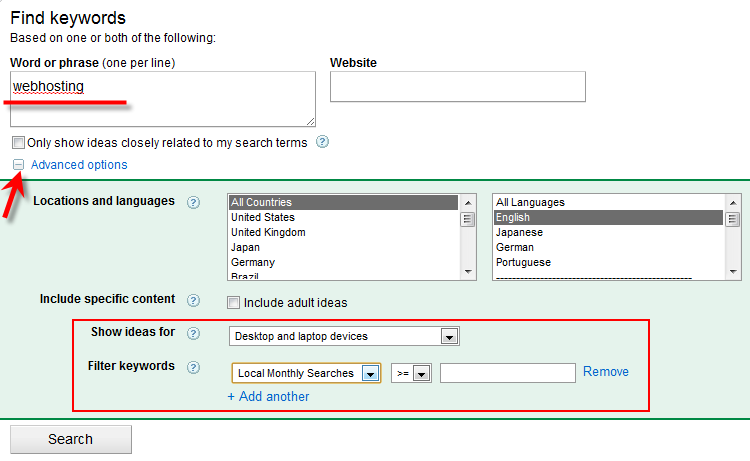
Some filter options are available under Advanced options.
Once you press the Search button, it will list out the keywords related to search term. The fields are easy to understand.
If you still can’t find the very suitable keyword for ‘Webhosting’, this can be filtered by Match Typesin left side.
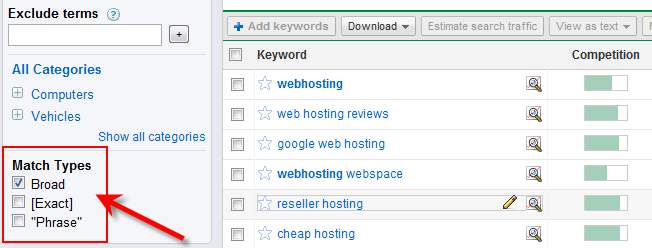
Remove the ‘Board’ type and select either Exact or Phrase.
‘Exact’ will bring the more relevant keyword for your search term.
“Phrase” will bring the same search term text in keywords.
But, we are here to get the high paying keyword related to ‘Webhosting’, so first do not not change any filter types under Match Types.
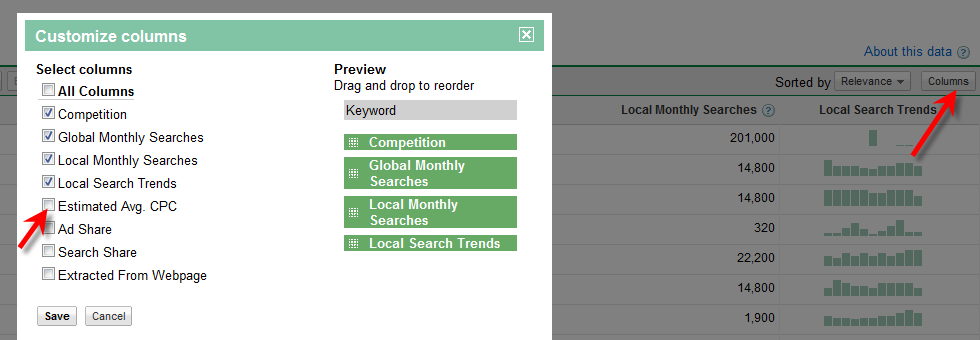
The first result screen in Google keyword tool doesn’t show the Estimated Avg CPC ( which decides the value of keyword), we have to enable this column by doing following steps.
Click on columns in right side of menu bar and select the Estimated Avg CPC.
What is Estimated Avg CPC?
As I said earlier, this tool is for advertisers. If I’m a advertiser and want to advertise my product or service through Google adwords, then I have to select some keyword for each ad slots.
For example if my main keyword for this ad campaign is ‘webhosting’, then I have to bid (pay) more than Estimated Avg CPC for ‘webhosting’ keyword for a click to beat the competitors. So, my ads will be displayed in Google’s first search result (Search results related to webhosting), top blogs and blog posts related to ‘webhosting’.
So, obviously high Estimated Avg CPC means, high pay out for publishers also if we get the correct ads.
Now click on Estimated Avg CPC column to sort the filed.

Here you have to understand something clearly and select the correct keyword.
Competition
Again this is not for us, this means the competition between advertisers, there are more advertisers bidding and advertising on this keyword.
If you want to find the competition for specific keyword as a blogger, then just simply type this keyword in Google and see the number of search results found.
The arrow mark I showed next to Competition column will give more ideas on this keyword about trend and history from Google Insights. It’s another handy tool for bloggers to find out the good keyword and niche for a blog or post.
Global and Local Searches
This should be considered too. If you target only high paying keyword but no one is searching that, then its pointless and you can’t make any money from adsense.
You should be very smart to select the correct high paying keyword. If you select the high searched keyword, then it will have more competition. Getting in to Google’s first page for this keyword is not at all an easy task.
In this example, I would prefer to write about ‘ Top web hosting’. Its having high paying keyword with good search history.
But unfortunately, its having more competition with 140,000,000 results (as of today). so I don’t think I can beat them.

In this case, I follow my own way to utilize this high paying keyword to monetize my blog posts with adsense.
I will write that technique in coming days.
Feel free to drop your comments and suggestion about these steps.


